
Download IPTV Player APK – free IPTV app, Android IPTV player, live TV streaming, watch TV on mobile
Overview
IPTV Player APK is a dedicated multimedia application designed for Android devices, offering users a streamlined way to access live television content through digital streaming. Developed by M D S, the app functions as a lightweight yet functional IPTV player, enabling users to play and manage streaming content from various sources. It is particularly suited for individuals seeking a simple, free solution for watching live TV on their mobile devices, such as smartphones and tablets.
The app supports multiple playlist formats, including .m3u, .m3u8, .asx, .pls, and .xspf, which allows users to import and organize content from external sources. This makes it ideal for those who already have access to IPTV subscription playlists or custom channel lists. The ability to manage favorites and playlists adds a layer of personalization, helping users quickly access their preferred channels. Real-world usage scenarios include watching live sports, news broadcasts, or regional programming while on the move or at home.
While the developer did not provide detailed background information, the app’s focus on simplicity and compatibility with standard streaming protocols suggests a targeted approach to delivering core functionality without unnecessary complexity. It is not intended for advanced users seeking extensive customization but rather for consumers who prioritize ease of use and immediate access to live content.
Key Features & Capabilities
- Multi-format Playlist Support: IPTV Player APK supports a range of standard playlist file types, including .m3u, .m3u8, .asx, .pls, and .xspf. This allows users to import playlists from various providers or self-hosted sources, enhancing flexibility in content access.
- Favorites and Playlists Manager: The app includes tools to save favorite channels and organize them into custom playlists. This feature improves navigation and reduces the time needed to locate frequently watched content.
- Live TV Streaming: Designed for real-time broadcast viewing, the app enables users to stream live television channels directly from their playlists, supporting uninterrupted playback for sports, news, and entertainment.
- DLNA Casting Support: Users can cast streamed content to compatible DLNA-enabled devices, such as smart TVs or media receivers, allowing for larger-screen viewing without requiring additional hardware.
- Simple and Intuitive Interface: The user interface is designed with minimalism in mind, featuring straightforward navigation and clear visual cues to help users quickly find and play channels.
These capabilities make the app suitable for casual viewers who want a no-frills way to access live TV on Android. For example, a user with a personal playlist of regional news channels can easily load it, mark favorites, and stream content directly to their device or cast it to a TV for a shared viewing experience.
User Interface, Workflow & Performance
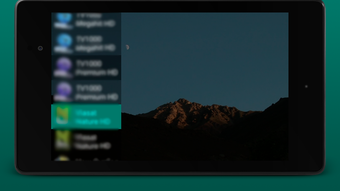
The user interface of IPTV Player APK is clean and focused on core functionality, prioritizing ease of access over visual embellishment. Navigation is primarily based on a channel list displayed in a simple grid or list format, with options to filter by favorites or custom playlists. The layout is consistent across screens, which helps reduce the learning curve for new users.
Workflow efficiency is enhanced by the app’s direct playlist import feature, allowing users to load external files with minimal steps. Once a playlist is loaded, channels appear in a categorized list, and playback begins immediately upon selection. The interface does not include advanced settings or customization options, which may appeal to users who prefer a distraction-free experience.
Performance observations are based on general software behavior patterns. The developer did not specify resource usage details, and no performance benchmarks were provided. However, the app’s relatively small size of 12.5 MB suggests it is optimized for low memory consumption. Stability during playback may depend on the quality and reliability of the source streams, which are external to the app.
Compatibility & System Requirements
IPTV Player APK is designed for Android operating systems. The app is compatible with devices running Android 5.0 and above, though specific version compatibility was not listed in the provided information. Installation size is 12.5 MB, indicating a lightweight footprint that should not strain older or low-end devices.
Exact system requirements were not listed. The developer did not provide details on minimum CPU, RAM, or GPU specifications. Compatibility with specific Android versions or device types remains limited to what is publicly available. Users should ensure their device meets standard Android app requirements to run the application smoothly.
Pros and Cons
Pros
- Free to download and use with no in-app purchases
- Supports multiple playlist formats for flexible content integration
- Simple, intuitive interface ideal for casual users
- Includes favorites and playlist management tools
- Offers DLNA casting for big-screen viewing
- Lightweight installation at 12.5 MB
Cons
- No advanced playback or customization settings available
- Exact system requirements not specified
- Dependent on external playlist sources for content
- Does not include built-in channel discovery or search
- Performance may vary based on stream quality and network conditions
FAQ Section
Is IPTV Player APK safe to use?
The app itself is free and available through official Android channels. However, the safety of the streaming experience depends on the source of the playlists used. Users should only import playlists from trusted providers to avoid potential security risks.
Can I use IPTV Player APK on my iPhone?
No, the app is designed exclusively for Android devices. There is no iOS version available at this time.
Does IPTV Player APK require a subscription?
The app is free to download and use. However, access to live TV content requires external playlists, which may be part of a paid IPTV service or freely available online.
How do I update IPTV Player APK?
Updates are typically delivered through the Google Play Store or official developer channels. Users should check for updates in their app store or visit the developer’s website for the latest version.
Can I watch live TV offline with IPTV Player APK?
No, the app requires an active internet connection to stream content. It does not support downloading or storing live streams for offline viewing.
Final Thoughts + CTA
IPTV Player APK delivers a straightforward and reliable solution for Android users seeking to stream live television content on their mobile devices. With support for multiple playlist formats, a clean interface, and the ability to cast to DLNA devices, it stands out as a practical tool for casual viewers who value simplicity and flexibility. While it lacks advanced features and detailed system requirements, its lightweight design and free access make it accessible to a broad audience.
Those who already have access to IPTV playlists—whether from personal setups or third-party providers—will find this app particularly useful. It is not a content provider but a robust player that enhances the viewing experience across devices.
Download IPTV Player APK now





.png)

